



Gemini in Android Studio
The ICanHazStream Quest

Kartik Arora

Lead Engineer @

GDE Android

kartikarora.me

Workshop Overview: 3 Acts

AI tooling in Android Studio has evolved from simple autocompletion into an interactive co-developer across the entire engineering lifecycle.

  • Act 1: Daily In-Editor AI & Guardrails — AGENTS.md, .aiexclude, in-editor diffs via context menu, Java-to-Kotlin math transforms, and XML-to-Compose.
  • Act 2: Design to Code & Agent Mode — Wireframe multimodal generation, Transform UI in Previews, GitHub MCP Server, and multi-module self-healing Gradle builds.
  • Act 3: Quality, Verification & CLI — In-memory test fakes with Turbine, Logcat crash diagnostics, Studio Journeys E2E tests, and the headless Android CLI.

Modern Android Challenges

Today's Android codebases demand rigorous architectural patterns and rapid modernisation:

  • Multi-Module Overhead: Coordinating changes across :feature, :core:ui, :core:data, and :core:model.
  • Legacy Debt: Migrating older Java utility classes and XML layouts to Jetpack Compose Material 3.
  • Reactive State: Moving from legacy LiveData streams to type-safe Kotlin StateFlow.
  • Deterministic Testing: Verifying asynchronous UI and data streams without fragile mockito overhead.

Introducing ICanHazStream

me.kartikarora.icanhazstream

Our companion application is a multi-module streaming availability finder. The starter app is immediately functional and interactive (Explore screen with trending movies, movie detail Where to Watch navigation, and Watchlist).
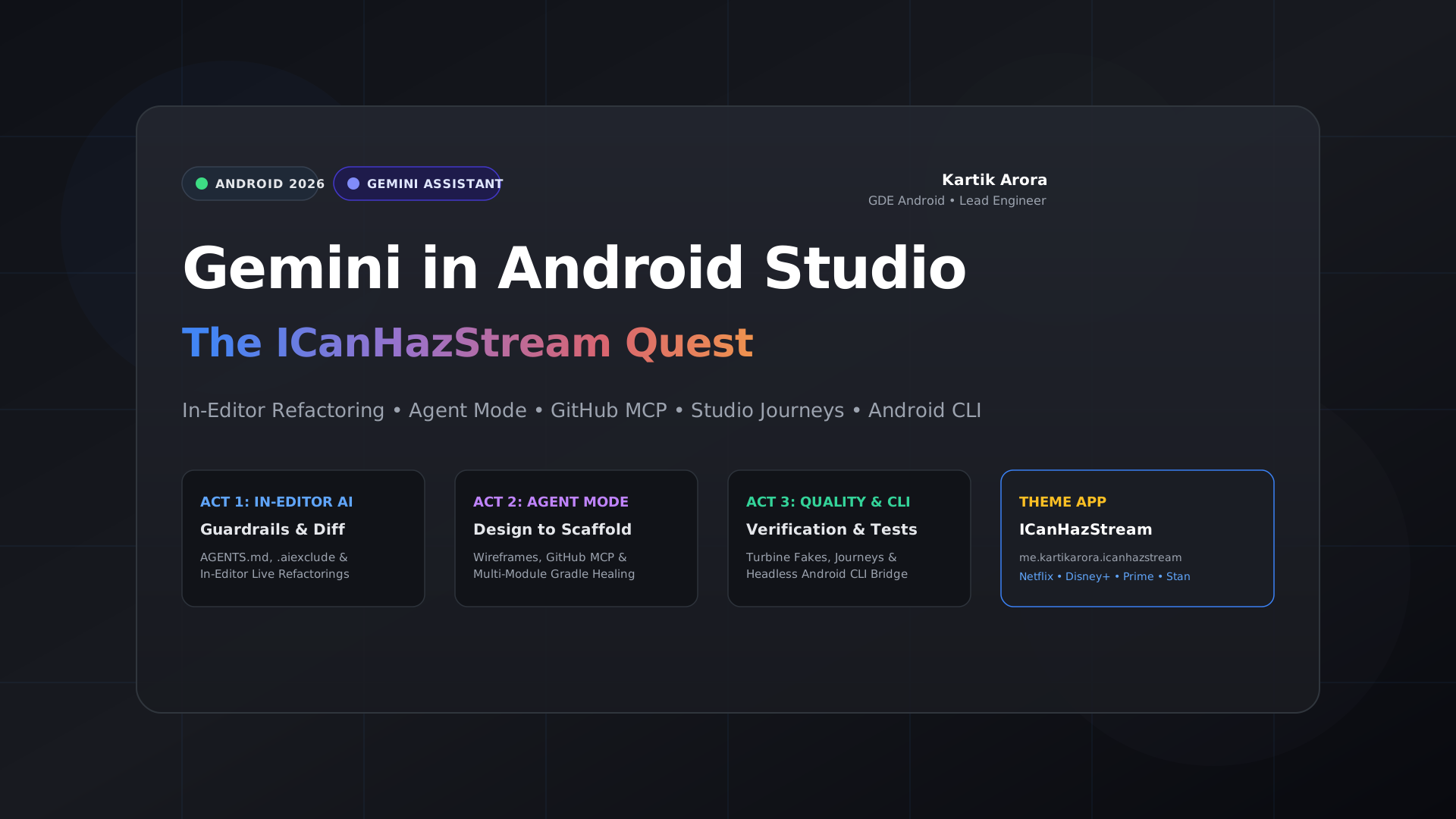
ICanHazStream Theme Banner

Modern Tech Stack & Standards

Built on the latest Android & Kotlin toolchain:

  • Android Studio Rabbit 2 (2026.2.2 Canary 3): Studio Labs, Agent Mode & bundled JDK 25.
  • Kotlin 2.4.20 & Gradle 9.8.1: Type-safe build-logic convention plugins.
  • Jetpack Compose BOM 2026.09: Material 3 design system with Albert Sans typography.
  • JetBrains Ktor Client 3.6.0: Clean HTTP networking with kotlinx.serialization.
  • Testing with Turbine 1.2.1: Streamlined testing of StateFlow with in-memory test fakes.

Act 1: Daily In-Editor AI & Guardrails

Establishing clear project rules, inline refactorings, and legacy modernisation.

Guardrails Architecture

Grounding Gemini with explicit architecture rules while safeguarding secrets:

  • AGENTS.md: Mandates MVVM, Clean Architecture, and reusing pre-built :core:ui components.
  • .aiexclude: Completely blocks local.properties, keystores, and API credentials from AI context indexing.
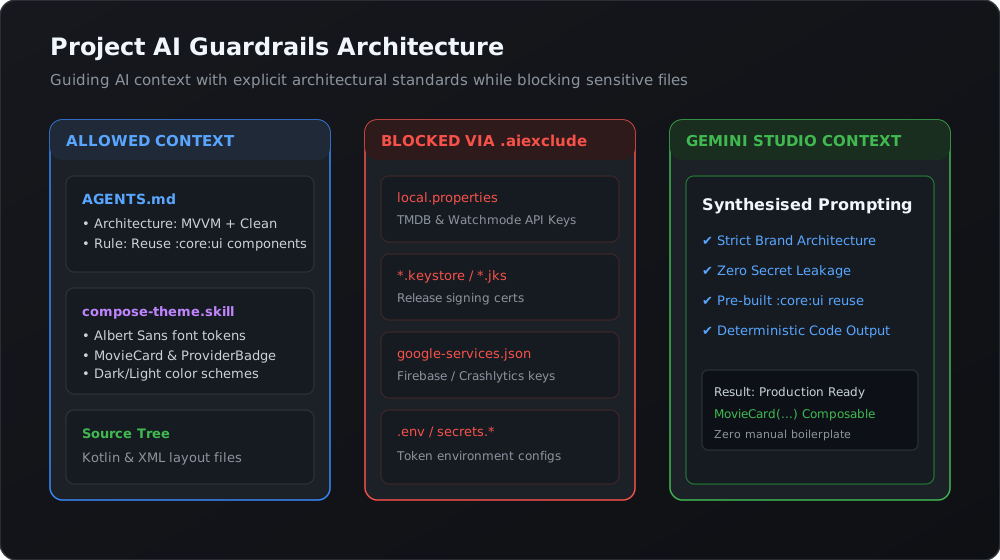
Guardrails Architecture

Grounding with Brand Theme Skill

Ground Gemini in our pre-built Compose design system so it produces consistent, branded composables instead of raw unstyled components:


# Install the brand AI skill into Android Studio project
npx skills install https://distribute.kartikarora.me/ai/kartikarora-compose-theme.skill
                
  • Teaches Gemini about MovieCard, ProviderBadge, and RatingChip in :core:ui.
  • Automatically applies Albert Sans & JetBrains Mono design tokens.

In-Editor Prompts & Live Diffs

Refactoring LiveData to StateFlow with Gemini in-editor live diffs:

  • Highlight legacy MutableLiveData streams in TrendingMoviesViewModel.kt.
  • Right-click in the editor and choose Gemini > Generate Code with Gemini (or Refactor with Gemini).
  • Review side-by-side diffs before committing changes into your file.

// In-editor prompt result:
private val _movies = MutableStateFlow<List<Movie>>(emptyList())
val movies: StateFlow<List<Movie>> = _movies.asStateFlow()
                

Modernising Legacy Java & XML

Modernising movie cards from initial baseline/XML into full Compose MovieProviderCard with :core:ui design tokens:
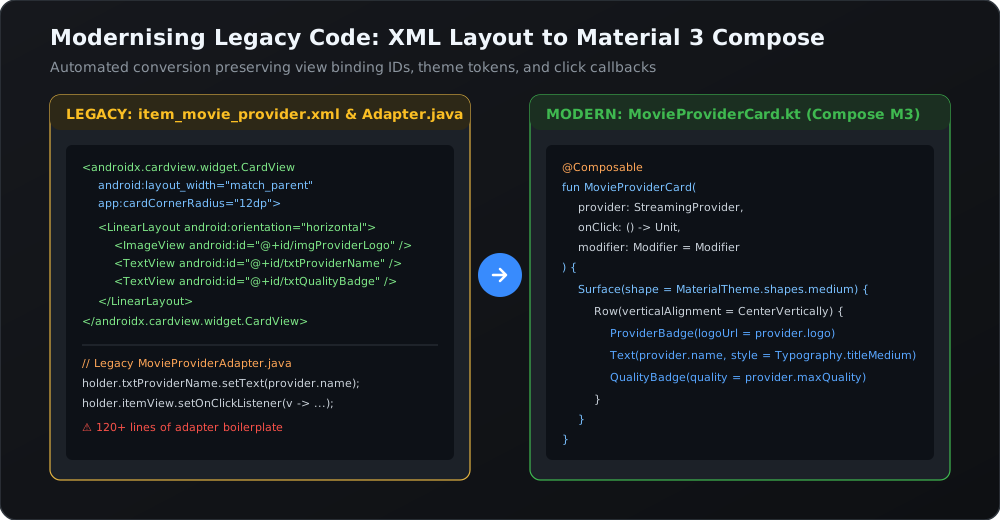
XML to Compose Transformation

Act 2: Design to Code & Agent Workflows

From visual sketches to multi-module architecture with Agent Mode and MCP.

Refining UI from Wireframe Mockup

Refining and generating the Where to Watch detail screen from wireframe mockup sketches:
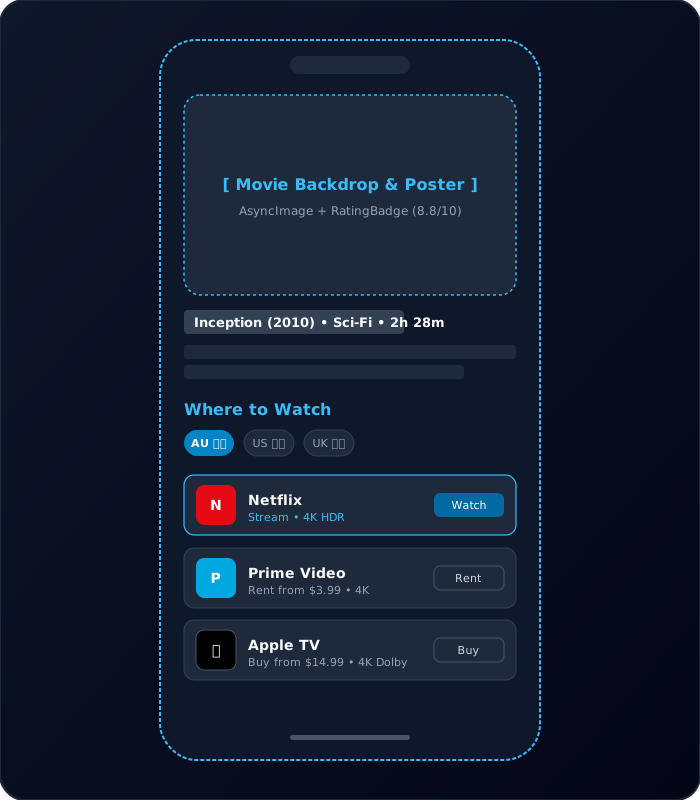
Wireframe Sample

Tweaking UI in Compose Previews

Iterate on user interfaces visually without re-running the application:

  • Open WhereToWatchScreen.kt with @PreviewLightDark.
  • Click Transform UI with Gemini in the Compose Preview toolbar.
  • Prompt: “Add a subtle outline around the 4K Ultra HD badge and increase provider spacing to 12dp.”
  • Changes reflect live in preview rendering instantly.

Connecting Context via GitHub MCP

Model Context Protocol connects Gemini to upstream GitHub repositories:

MCP Architecture

Scaffolding Features with Agent Mode

Scaffolding the Watchlist feature across modules (:feature:watchlist, :core:data, navigation graph) with Agent Mode:
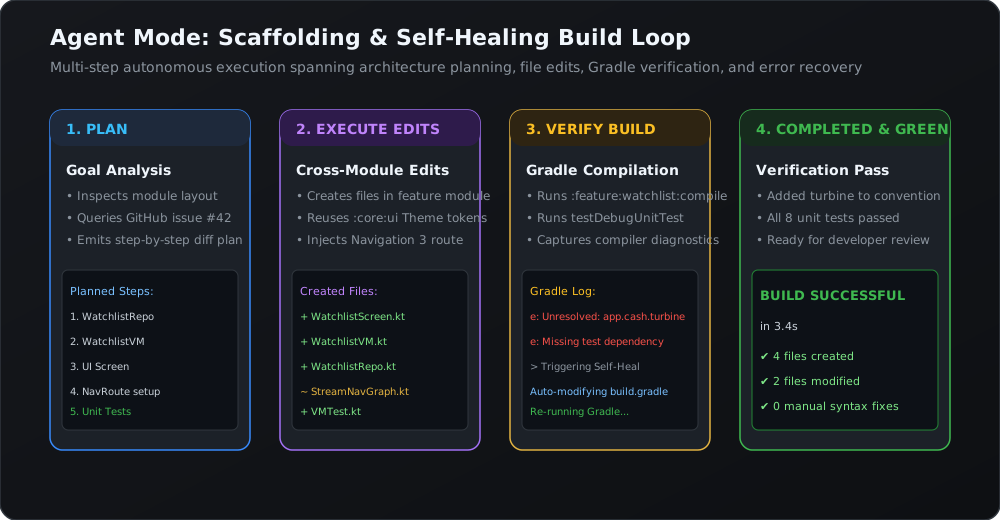
Agent Mode Scaffolding & Build Healing Loop

Act 3: Quality, Verification & Headless CLI

Unit testing with fakes, natural-language E2E journeys, and terminal automation.

Testing with In-Memory Fakes & Turbine

Test reactive streams deterministically without complex mock frameworks:


@Test
fun testChangingRegionUpdatesProviders() = runTest {
    val fakeRepo = FakeMovieRepository()
    val viewModel = WhereToWatchViewModel(fakeRepo)

    viewModel.uiState.test {
        assertThat(awaitItem()).isInstanceOf(UiState.Loading::class.java)
        
        fakeRepo.emitProviders(listOf(StreamingProvider("Netflix", Quality.UHD_4K)))
        val state = awaitItem() as UiState.Success
        assertThat(state.providers.first().name).isEqualTo("Netflix")
    }
}
                

Studio Journeys: Plain-English E2E Tests

Studio Journeys E2E test verifying live navigation from Explore → Dune: Part Two → Stream tab → Netflix 4K AU$16.99 → Watch:
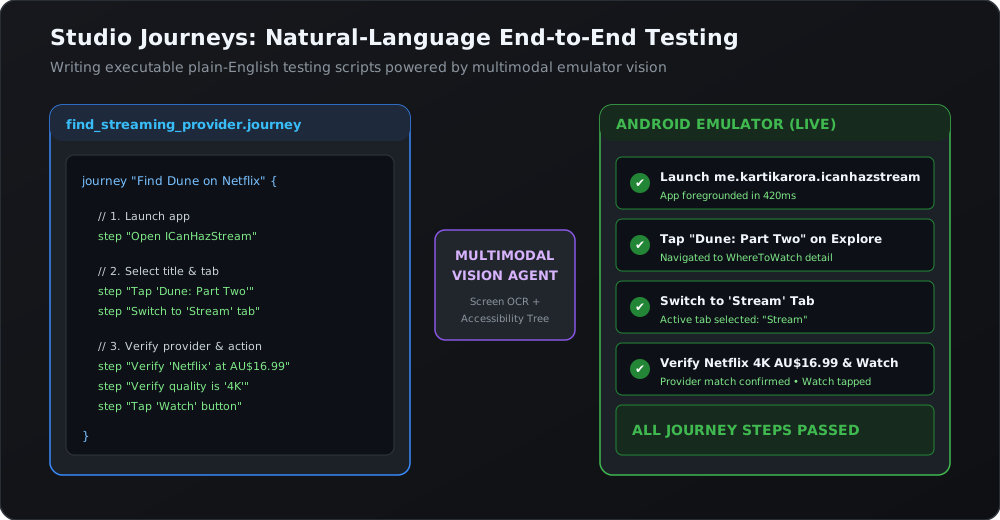
Studio Journeys Flow

Headless Automation: Android CLI

Execute Android Studio symbol indexing, preview renders, and lint fixes directly in terminal:
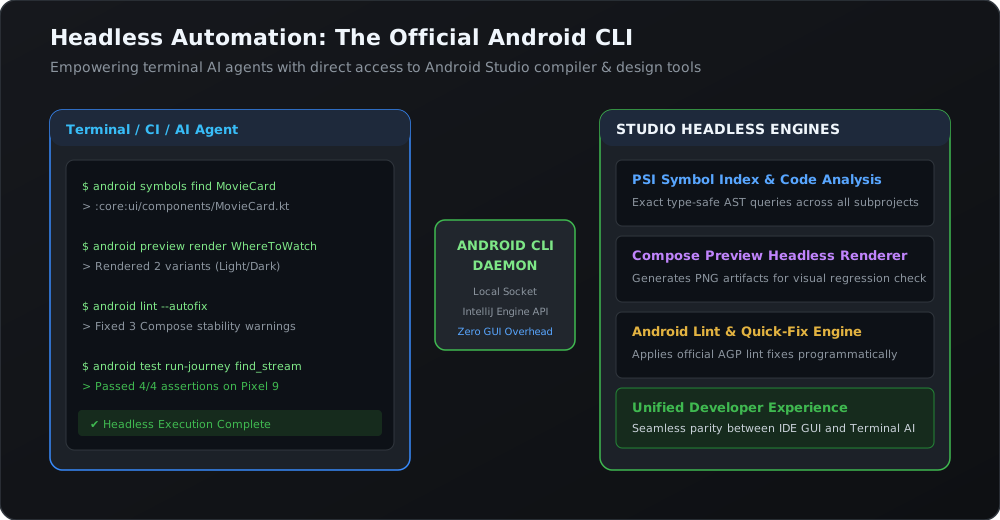
Android CLI Bridge

App Quality Insights & Gemini

Correlating production Crashlytics and Google Play Vitals with source lines for instant fixes:
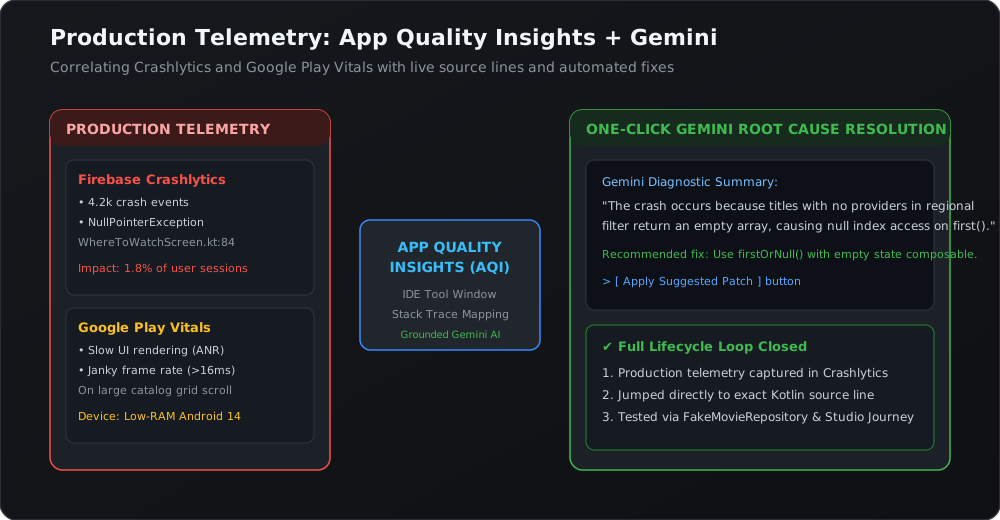
App Quality Insights Infographic

Workflow Summary

The modern AI-assisted Android development lifecycle:

  • Ground with Intent: Use AGENTS.md and theme skills so the model adheres to your architecture.
  • Accelerate In-Editor: Right-click and choose Gemini from the context menu for instant, reviewable diffs and code transformations.
  • Scaffold in Agent Mode: Let the agent coordinate multi-module changes and self-heal Gradle builds.
  • Verify Rigorously: Assert state with Turbine, execute Studio Journeys, and automate with the Android CLI.

On-Device AI Options

Bring inference directly to user devices with zero server latency:

  • Gemini Nano via AICore: System-managed on-device foundation model on Pixel and supported flagship Android devices.
  • Google Play services ML Kit GenAI Prompt API: Zero-setup on-device text generation with automated model downloading and fallback.
  • Offline Availability & Privacy: Process sensitive queries, movie summaries, and recommendation rankings entirely on-device.

Dig Deeper & Resources

Keep exploring with these workshop links and documentation:

Happy building with Gemini in Android Studio!
FIN.

Android 2026 QR Code

Kartik Arora

Lead Engineer @

GDE Android

kartikarora.me

Questions & Discussion